
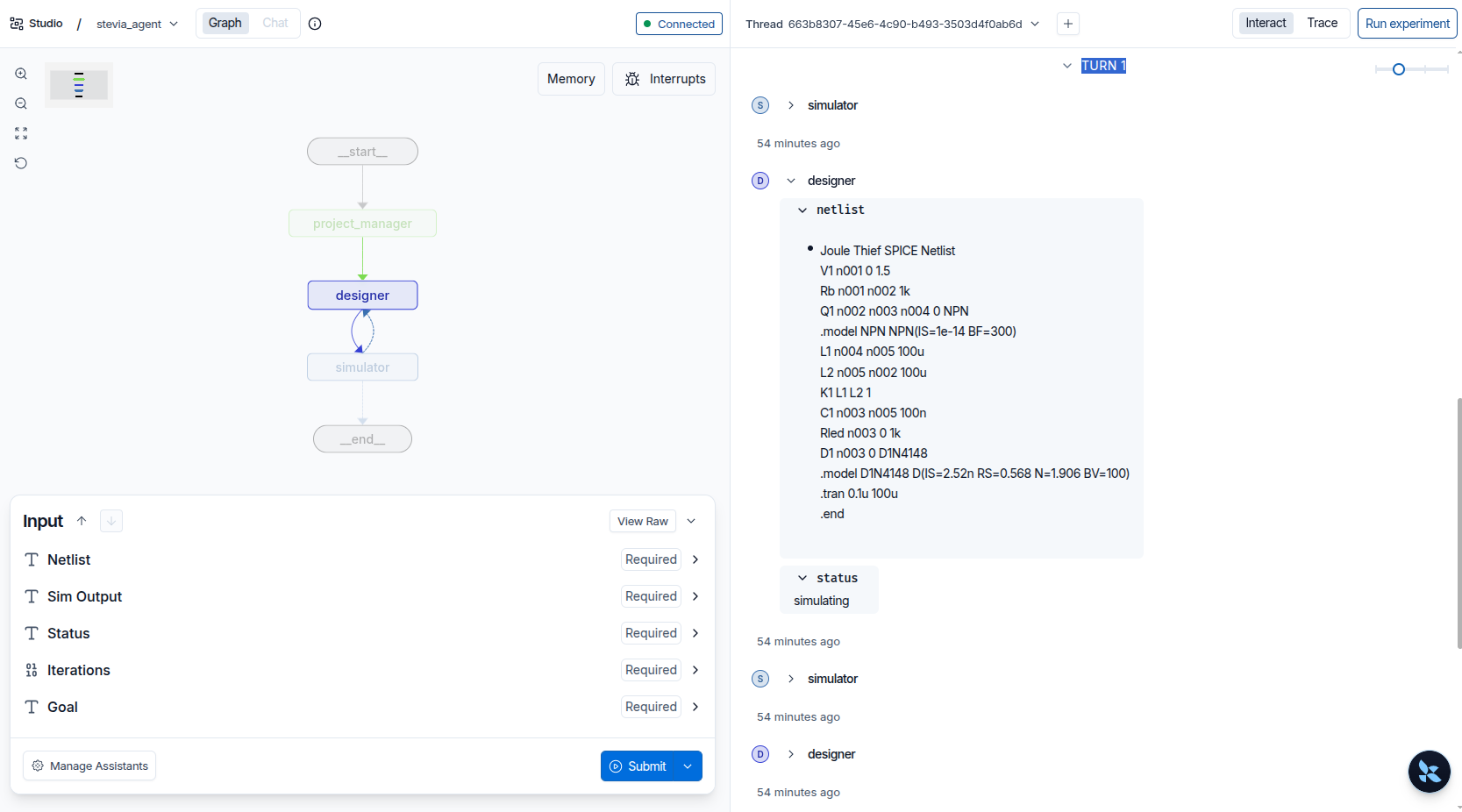
Let’s take a look at what we can build!
The “In-Circuit Debugger” for AI
If you’ve ever worked with microcontrollers, you know the feeling. You flash a chip, it doesn’t work, and you’re left staring at a silent piece of silicon :'(
To fix it, you need an In-Circuit Emulator (ICE) or a Logic Analyzer. You need to see the registers, the stack, and the timing in real-time.
Building an AI Agent to design electronics is exactly the same. Without a “Debug Header,” the AI is just a black box spitting out text.
I built Stevia, a LangGraph-powered agent that lives on my local machine, to design Spice circuits. However i need to be able to peek inside, to troubleshoot, and make sure it has everything it needs to do what I need. I will use LangGraph Studio, which is like having a Logic Analyzer for the AI’s thought process.
The Vision: From Chatbots to Orchestrators
Most people use AI as a fancy chat. I’m using it as a General Contractor.
I give the agent a goal—“Build a 1.5V Joule Thief circuit”—and it starts a loop:
- Design: Write a SPICE netlist.
- Simulate: Run that code through a real ngspice engine.
- Analyze: Read the raw simulation logs.
- Fix: If it didn’t boost the voltage, try again.
The Tech Stack: A Hybrid Beast
This isn’t just a Python script. It’s a distributed system running across three layers:
- The Brain (Local Host): Python 3.12 and the LangGraph CLI.
- The Lab (Docker): A containerized ngspice engine and a PostgreSQL database for long-term memory.
- The GUI (LangGraph Studio): The web-based “Logic Analyzer” where I watch the nodes light up.
The Tools: Why LangGraph Studio?
Another option is LangFuse. It’ looks like great tool for tracking logs and costs, but it feels like looking at a spreadsheet after the race is over. LangGraph Studio gives you the “In-Circuit” visuals. You can pause the AI, change a variable in the middle of a loop, and hit “Resume.” Just from LangFuse appearance, it feels like reading a flight log and actually sitting in the cockpit. I am an engineer though, and of course i am curious how it works! So that will be in the future.
Preparing the Workbench
Before we can design circuits, we have to prep the environment. Here are the commands that got the “Lab” online:
bash
# 1. Enter the virtual environment
source stevia/bin/activate

# 2. Install the 'Debug Header' (The CLI and In-Memory engine)
pip install -U "langgraph-cli[inmem]"

# 3. Spin up the 'Lab' (Database and Simulation Container)
docker compose up -d

# 4. Verify the Lab Tools are ready
docker exec spice_agent ngspice --version
The First Hurdle: The CORS “Shields”
When you try to connect your local code to the web-based Studio, your browser (my Brave) will try to block it. It thinks the website is “attacking” your local machine.
I solved this by using a Secure Tunnel. It creates a temporary, encrypted bridge so the Studio can talk to my local agent without the browser throwing a tantrum:
bash
# Launch the dev server with a secure bridge
langgraph dev --tunnel
The “First Power-On” Test
In the microcontroller world, the “Smoke Test” is when you power up the board for the first time. In AI engineering, it’s when you hit Submit in the Studio and watch the nodes pulse blue.
I gave Stevia a simple goal: “Build a Joule Thief. If you fail, read the error and fix the netlist.”
Then, I sat back and watched the Logic Analyzer (LangGraph Studio) show me exactly what happens when an AI tries to be an electrical engineer.
The 10-Iteration “Bailout”
My code has a hardcoded recursion_limit of 10. This is the “Watchdog Timer.” If the AI gets stuck in a logic loop, the system resets before it drains my API budget.
And it did get stuck. 🔄
The Loop of Death:
- Designer Node: Generates a SPICE netlist for the Joule Thief.
- Simulator Node (ngspice): Runs the code inside the Docker container.
- The Crash:
Note: No ".plot", ".print", or ".fourier" lines; no simulations run. - Analysis Node: Sees the empty output, flags it as a “Failure,” and sends it back to the Designer.
Stevia did this 10 times. It was like watching a junior dev forget to add a printf statement to their code, then doing it again in ten different ways.
Why the AI Failed (The “Hallucination” Gap)
The AI knows what a Joule Thief is, but it doesn’t always remember the strict syntax of ngspice-44.2.
It’s like trying to compile C code when you’ve only read the textbook but never used the compiler. Without a “Reference Library” or a “Datasheet,” the AI is just guessing component values.
The Successor AI Handoff
Since the 10-iteration limit was hit, I’m treating this as a Memory Handoff. Here is exactly what the system consists of right now and how we’re tweaking it:
The System Blueprint:
- Docker Container (
agent_memory): A Postgres 16 instance. It holds the “Checkpoints”—the persistent state of every single run. Even if the container crashes, the memory stays. - Local Environment (
stevia): The Python 3.12 venv where the LangGraph CLI manages the API handshake. - The Code (
main.py): The “Graph” that separates the Project Manager (Strategy) from the Designer (Coding) and the Simulator (Execution).
Pros & Cons of the Current Build
| Feature | Status | Impact |
|---|---|---|
| Persistence | ✅ Solid | Postgres saves every “Thread ID” (e.g., circuit_test_011). |
| Tooling | ⚠️ Limited | The AI only has a “Netlist Generator.” It can’t “Google” a fix yet. |
| Observability | ✅ Elite | LangGraph Studio lets me step through every failure visually. |
The Next Milestone: Giving the Agent Internet of Knowledge
In the next phase, we’re moving beyond “Structured Autonomy” and into Tool-Augmented Engineering.
Instead of letting the AI guess transistor models, I’m giving it a Browser Tool. It will be able to:
- Search for real-world transistor datasheets (2N3904, BC547).
- Pull the actual Gain (hFE) and Saturation values.
- Plug those real numbers into the simulation.
We’re gonna be turning the AI from a “Creative Writer” into a “Data-Driven Engineer.”
Also, I’m looking for partners who want to automate their R&D pipelines. If you have a repetitive engineering task, I can build an agent to solve it while you sleep.
Bye.
Leave a Reply